
A transparent, commission-free marketplace built by search professionals for search professionals. Learn how to post projects, discover elite SEO talent, submit winning proposals, and manage workflows with zero platform fees.
Select your primary objective:
Why People Behind Search Was Built
Mainstream freelance platforms often levy 10% to 20% commission fees on contracts, lock client-freelancer communications behind rigid walls, and commoditize specialized skills. People Behind Search was engineered with a singular focus: connecting businesses directly with vetted search marketing professionals under a 100% free, zero-commission structure.
Whether you need an in-depth technical audit, international hreflang architecture, high-intent programmatic keyword mapping, or bespoke digital PR link acquisition, this guide walks you through every stage of the workflow.
Step-by-Step: How to Hire Top SEO Specialists
Create Your Employer Account
Getting started requires only an email address. Register as an Employer / Client to unlock the project submission pipeline and candidate messaging tools.
- Navigate to the Registration Page.
- Select Employer (I want to hire SEO talent) as your account type.
- Verify your email address to immediately access your publishing dashboard.
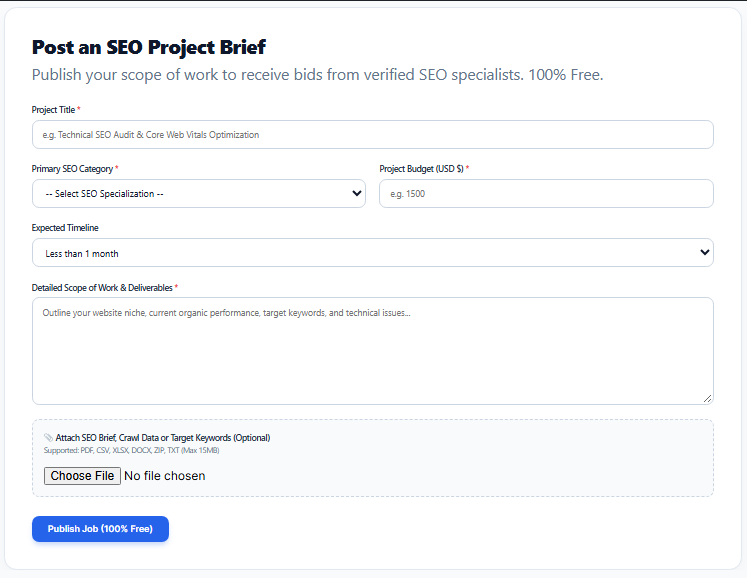
Publish an In-Depth SEO Project Brief
High-caliber specialists prioritize well-defined scopes. When posting via Post an SEO Job, avoid generic descriptions like “Need SEO for my website.” Instead, outline:
- Project Objective: Migration audit, core web vitals remediation, backlink gap analysis, or content brief production.
- Current Tech Stack: WordPress, Shopify, Next.js, Headless CMS, etc.
- Deliverables & KPIs: Measurable milestones with expected deadlines.
- Realistic Budget: Fixed project rate in USD reflecting the project scope.
Reviewing Proposals & Specialist Credentials
Once your project is live, SEO specialists will review the brief and submit customized proposals containing their proposed fee, timeline, and strategic approach.

Awarding Contracts & Finalizing the Project
Once you select the best candidate, click Accept Proposal. The specialist will be officially assigned, notified, and work begins. Upon satisfactory delivery of all milestones, mark the project as Completed and leave a verified rating and review to support the specialist’s reputation.
Step-by-Step: How to Find & Win SEO Projects
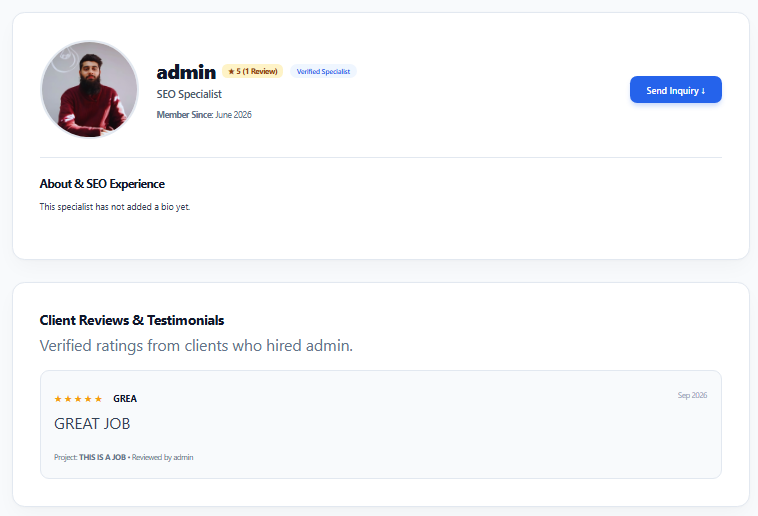
Build a High-Converting Specialist Profile
Clients evaluate your profile before accepting bids. When registering as an SEO Freelancer:
- Highlight your core specialties (e.g., Technical SEO, Semantic Content, E-commerce Shopify SEO, SaaS Outreach).
- Set a clear hourly baseline or project minimum.
- Include verifiable proof: organic traffic growth metrics, ranking improvements, and sample deliverables.
Search and Filter Live Project Listings
Head to the Browse Projects Feed to discover active contracts. Filter listings by category (e.g., On-Page SEO, Link Building, Technical Audits) or search by specific keywords matching your skillset.
Use the Save Job button (bookmark icon) to flag listings you want to analyze before drafting your pitch.
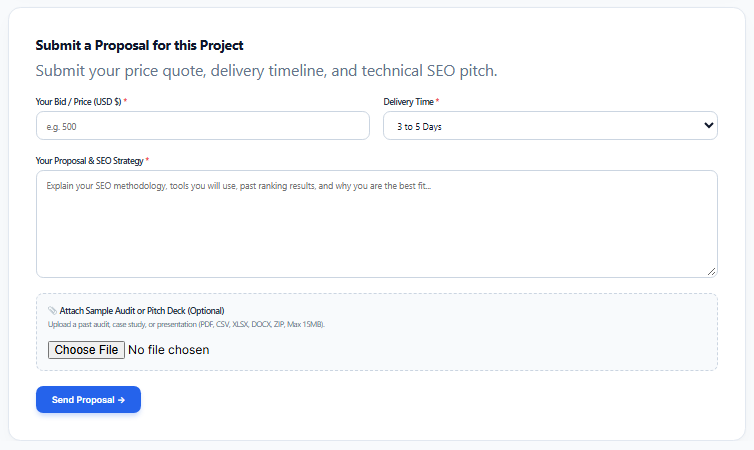
Submitting a High-Impact Proposal
To win contracts against competing applicants, structure your proposal with clarity:
- Diagnosis: Acknowledge the specific issue mentioned in the client’s brief (e.g., lost traffic after a CMS migration).
- Actionable Road Map: Break your proposed execution into 3–4 logical phases.
- Transparent Pricing: State your exact fixed bid or milestone fee. Remember: You keep 100% of your quote with zero platform deductions.
Mastering the User Dashboard
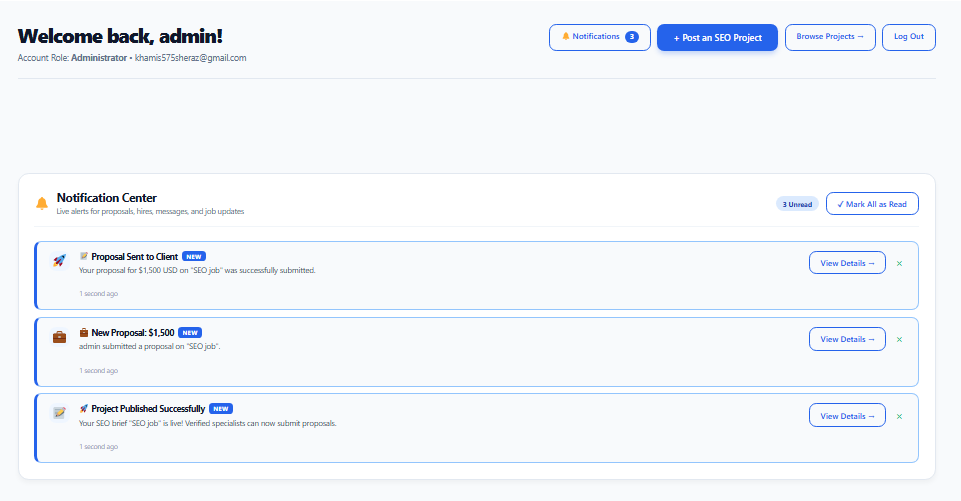
Your PBS Dashboard consolidates all marketplace activity into one central interface:
📋 Active Projects & Bids
Track proposal states in real-time: Pending Review, Hired / In Progress, and Completed.
🔔 Instant Notifications
Receive immediate alerts when an employer accepts your proposal or when a new proposal arrives on your job.
🔖 Bookmarked Jobs
Access your saved project repository with one click to quickly monitor closing dates.
⭐ Verified Reputation
View your accumulated client feedback, star ratings, and completed contract history.
Your Getting-Started Checklist
Click the tasks below as you complete them to track your onboarding:
Frequently Asked Questions
Yes. There are no posting fees, no membership paywalls, and zero percentage commissions subtracted from freelancer earnings. The platform is designed to facilitate open collaboration without middleman tax.
Clients and specialists agree on project scopes and budgets directly through the proposal system. Once hired, you are free to coordinate milestones and settlement terms via your preferred invoicing or escrow methods.
Yes. Registered employers and agencies can maintain multiple concurrent listings across different categories (e.g., hiring a Link Builder and a Technical Auditor simultaneously).
Only clients who have officially hired and finalized a project with a specialist are permitted to submit reviews. This prevents fake feedback and guarantees an authentic reputation score.
Ready to Elevate Your Search Marketing?
Join hundreds of businesses and SEO specialists working together with zero commission barriers.